Color Formats
PickMe offers a versatile color format system that lets you copy colors to many major formats out of the box and even create custom formats.
PickMe provides pre-defined color formats out of the box. Additionally, you can create custom formats tailored to your needs.
Easily choose your default color format from the Main window or the Quick View window next to the color picker icon.
You can edit/create color formats in the settings window.

Formats can be reordered by drag and drop. The first three formats will be displayed on the Color Editor window for easy picking.
Format Editor
Using the Format Editor window you can edit a color format.
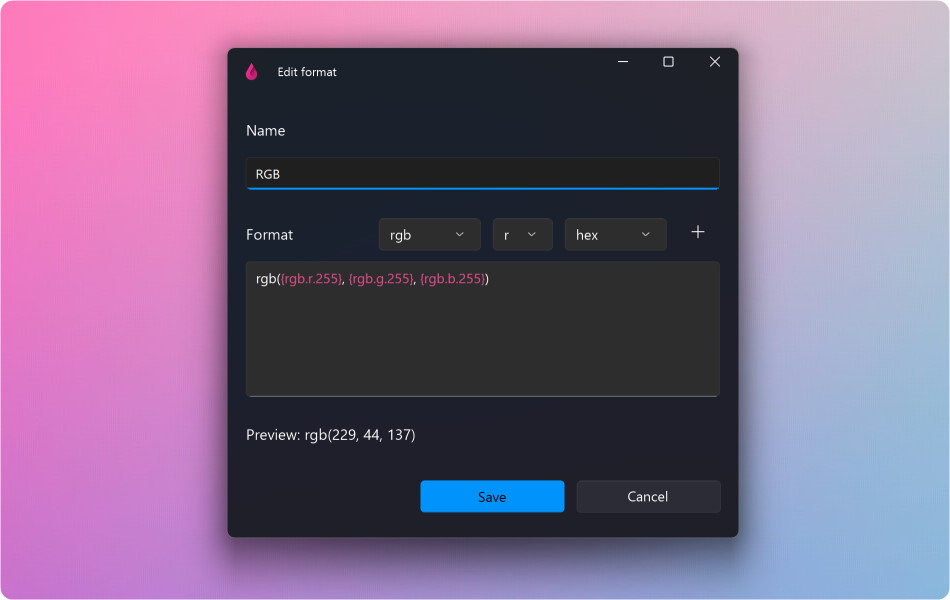
Variables
Formats rely on color variables enclosed in curly braces (e.g., {rgb.r.HEX}). These variables consist of three components: color space, component, and an optional formatting option.
Supported Color Spaces: RGB, HSB, HSL, and CMYK
Available formatting options:
- HEX Uppercase hexadecimal
- hex Lowercase hexadecimal
- 100 Numeric value between 0 and 100
- 255 Numeric value between 0 and 255
- 360 Numeric value between 0 and 360
- 1 Floating point value between 0 and 1
For example if you add the {rgb.r.HEX}, {rgb.r.HEX} and {rgb.r.HEX} variables to your format like so:
You will get a result like this when you pick a color:
You can use the special {name} variable to represent the color’s name. Customize its format:
- up Uppercase
- low Lowercase
- camel Camel case
- title Title case
- underline Replace spaces with underscores (_)
- dash Replace spaces with dashes (-)
Example: {name.camel} displays the color name in camel case (e.g., “navalBlue”).
Embrace the flexibility of PickMe’s color formats as you explore the vibrant world of hues!